
Darmowa dostawa od 100,00 zł
Stacja dokująca na USB-C Dell WD15 (K17A) z zasilaczem Dell 130W

Stacja dokująca na USB-C Dell WD15 (K17A) z zasilaczem Dell 130W

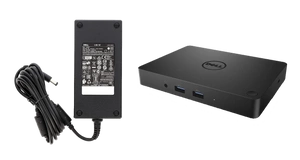
  • Dell WD15 K17A to poleasingowa stacja dokująca USB-C z zasilaczem Dell 130 W. HDMI, mini DisplayPort, VGA, 5 portów USB i LAN. Obsługa 2 monitorów Full HD 60 Hz, ładowanie laptopa do 90 W. Wymaga USB-C z DisplayPort Alt Mode.

148,61 zł

brutto / 1szt.
Najniższa cena z 30 dni przed obniżką: / szt.
Cena regularna: / szt.
Możesz kupić za pkt.
z
Możesz kupić także poprzez:
Dostępny
Skontaktuj się z obsługą sklepu, aby oszacować czas przygotowania tego produktu do wysyłki.
Dostępny
Wysyłka
14 dni na łatwy zwrot
Ten produkt nie jest dostępny w sklepie stacjonarnym
Bezpieczne zakupy
Po zakupie otrzymasz pkt.
95fc0f998c8542279f949d61b126137a

Dell WD15 K17A – stacja dokująca USB-C z zasilaczem 130 W

Dell WD15 (K17A) to poleasingowa stacja dokująca USB-C przeznaczona do rozbudowy stanowiska pracy z kompatybilnym laptopem. Umożliwia podłączenie monitorów, urządzeń USB, przewodowej sieci Ethernet oraz sprzętu audio za pomocą jednego połączenia z komputerem.

W oferowanej konfiguracji stacja jest wyposażona w zasilacz Dell 130 W i umożliwia dostarczanie do 90 W mocy do zgodnego laptopa.

Ważne: laptop musi obsługiwać przesyłanie obrazu przez USB-C w trybie DisplayPort Alt Mode. Samo posiadanie portu USB-C nie gwarantuje kompatybilności.

Najważniejsze parametry Dell WD15

  • Model: Dell WD15 / K17A
  • Połączenie z laptopem: USB-C z DisplayPort Alt Mode
  • Wyjścia obrazu: HDMI, mini DisplayPort, VGA
  • Porty USB: 3 x USB 3.0 (w tym 1 PowerShare), 2 x USB 2.0
  • Sieć: RJ-45 Gigabit Ethernet
  • Audio: złącze słuchawkowe i wyjście liniowe
  • Zasilacz stacji: Dell 130 W
  • Ładowanie laptopa: do 90 W w zgodnych urządzeniach

Ile monitorów można podłączyć do Dell WD15?

Stacja obsługuje różne konfiguracje monitorów, zależnie od możliwości komputera oraz wykorzystywanych złączy.

  • Jeden monitor: do 3840 x 2160 przy 30 Hz przez HDMI lub mini DisplayPort.
  • Dwa monitory: do 1920 x 1080 lub 1920 x 1200 przy 60 Hz na każdym ekranie.
  • Trzy monitory zewnętrzne: do 1280 x 1024 przy 60 Hz na każdym, przy wyłączonym ekranie laptopa.

Obsługa określonej konfiguracji zależy również od możliwości karty graficznej laptopa, systemu i monitorów.

Ograniczenie: Dell WD15 nie zapewnia obrazu 4K przy 60 Hz. Jeśli potrzebujesz dwóch monitorów o rozdzielczości 2560 x 1440 lub wyższej, warto wybrać nowszą stację o odpowiedniej przepustowości.

Zasilacz Dell 130 W a ładowanie laptopa

Oferowany zestaw zawiera zasilacz Dell o mocy 130 W. Jest to moc zasilacza stacji, a nie moc automatycznie przekazywana do laptopa.

W tej konfiguracji stacja może zapewnić do 90 W zasilania zgodnym laptopom przez USB-C. Rzeczywista możliwość ładowania zależy od modelu notebooka oraz obsługiwanych standardów zasilania.

Jeśli laptop wymaga większej mocy lub nie obsługuje zasilania przez USB-C, może być konieczne korzystanie z jego osobnego zasilacza.

Porty USB, LAN i audio

Dell WD15 pozwala podłączyć dodatkowe akcesoria, takie jak klawiatura, mysz, pamięć USB, drukarka czy przewodowa sieć komputerowa.

Stacja oferuje pięć portów USB typu A, z czego trzy pracują w standardzie USB 3.0, a dwa w USB 2.0. Jeden z portów USB 3.0 obsługuje funkcję PowerShare.

Gigabitowy port RJ-45 umożliwia korzystanie z przewodowej sieci Ethernet. Złącza audio pozwalają podłączyć odpowiednie słuchawki lub głośniki.

Z jakimi laptopami współpracuje Dell WD15?

Stacja jest przeznaczona do komputerów obsługujących DisplayPort Alt Mode przez USB-C. Była stosowana między innymi z wybranymi konfiguracjami serii Dell Latitude oraz Dell XPS.

Przykładowe rodziny obejmują Dell Latitude 5280, 5480, 5580, 7280, 7380 i 7480, a także wybrane modele XPS 13.

Przed zakupem należy sprawdzić:

  • Czy port USB-C laptopa obsługuje DisplayPort Alt Mode.
  • Czy laptop może być ładowany przez USB-C i jakiej mocy wymaga.
  • Jakie rozdzielczości i liczby monitorów obsługuje komputer.
  • Czy wymagane funkcje stacji są wspierane przez system operacyjny i sterowniki laptopa.

Port USB-C służący wyłącznie do przesyłania danych nie zapewni pełnej funkcjonalności tej stacji.

Dla kogo Dell WD15 będzie dobrym wyborem?

  • Praca biurowa: podłączenie dwóch monitorów Full HD, klawiatury, myszy i sieci LAN.
  • Home office: ograniczenie liczby przewodów podłączanych bezpośrednio do laptopa.
  • Stanowiska firmowe: wykorzystanie zgodnych notebooków Dell Latitude i XPS.
  • Użytkownicy starszych monitorów: możliwość wykorzystania złączy VGA, HDMI i mini DisplayPort.

Stan i zawartość zestawu

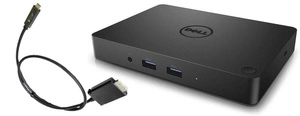
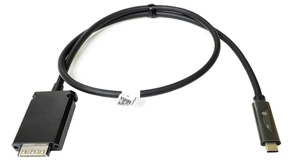
Przedmiotem oferty jest poleasingowa stacja dokująca Dell WD15 K17A z przewodem połączeniowym USB-C oraz zasilaczem Dell 130 W.

Produkt objęty jest 6-miesięczną gwarancją zgodnie z warunkami oferty DDPrint.

Stacja wykorzystuje zasilanie sieciowe i nie jest samodzielnym źródłem energii. Do jej działania należy podłączyć dostarczony zasilacz.

Co warto wiedzieć przed zakupem?

Dell WD15 jest starszą stacją dokującą USB-C. Nie należy jej mylić ze stacją Thunderbolt ani zakładać, że zapewnia wszystkie funkcje nowszych modeli.

Najważniejsze ograniczenia to obsługa 4K maksymalnie przy 30 Hz, wymagany tryb DisplayPort Alt Mode oraz limit zasilania laptopa wynoszący do 90 W z dołączonym zasilaczem 130 W.

Przy zakupie do konkretnego laptopa warto sprawdzić jego dokumentację techniczną, szczególnie wymagania USB-C, zasilania i obsługiwanych monitorów.

Marka
Rodzaj ostrzeżenia
Rodzaj ostrzeżenia
Okres gwarancji
6 miesięcy
Typ produktu
Stacja dokująca laptopa
Kompatybilne modele
Dell Latitude 5280|Dell Latitude 5285|Dell Latitude 5389|Dell Latitude 5480|Dell Latitude 5580|Dell Latitude 7280|Dell Latitude 7285|Dell Latitude 7380|Dell Latitude 7389|Dell Latitude 7480|Dell XPS 13|I wiele innych laptopów Dell posiadających złącze USB
Złącza / porty
1 x HDMI|1 x mini DisplayPort|1 x VGA|3 x USB 3.0|2 x USB 2.0|1 x Audio|1 x RJ-45
Zasilacz w zestawie
130W
Interfejs/złączeWięcej

Typ złącza za pośrednictwem którego możemy podłączyć urządzenie do komputera.

USB typu C
Producent
Dell
Potrzebujesz pomocy? Masz pytania?Zadaj pytanie a my odpowiemy niezwłocznie, najciekawsze pytania i odpowiedzi publikując dla innych.
Zapytaj o produkt
Jeżeli powyższy opis jest dla Ciebie niewystarczający, prześlij nam swoje pytanie odnośnie tego produktu. Postaramy się odpowiedzieć tak szybko jak tylko będzie to możliwe. Dane są przetwarzane zgodnie z polityką prywatności. Przesyłając je, akceptujesz jej postanowienia.
Napisz swoją opinię
Twoja ocena:
5/5
Dodaj własne zdjęcie produktu:
Prawdziwe opinie klientów
4.9 / 5.0 1132 opinii
pixelpixel